From the detail of a schedule to the decisions in the boardroom. Connect plans, shared resources, risks and approvals in a workspace that helps your team understand the impact — and act on it.
01Explain the delivery date02Compare your options03Coordinate shared resources04Keep decisions accountable
INSIDE THE WORKSPACE
See the product.
Understand what you can do with it.
These are actual Oxford Control screens. Choose a working scenario to see the information your team can inspect, the actions it can take and why connecting those activities matters.
Portfolio overview
Which projects need your attention today?
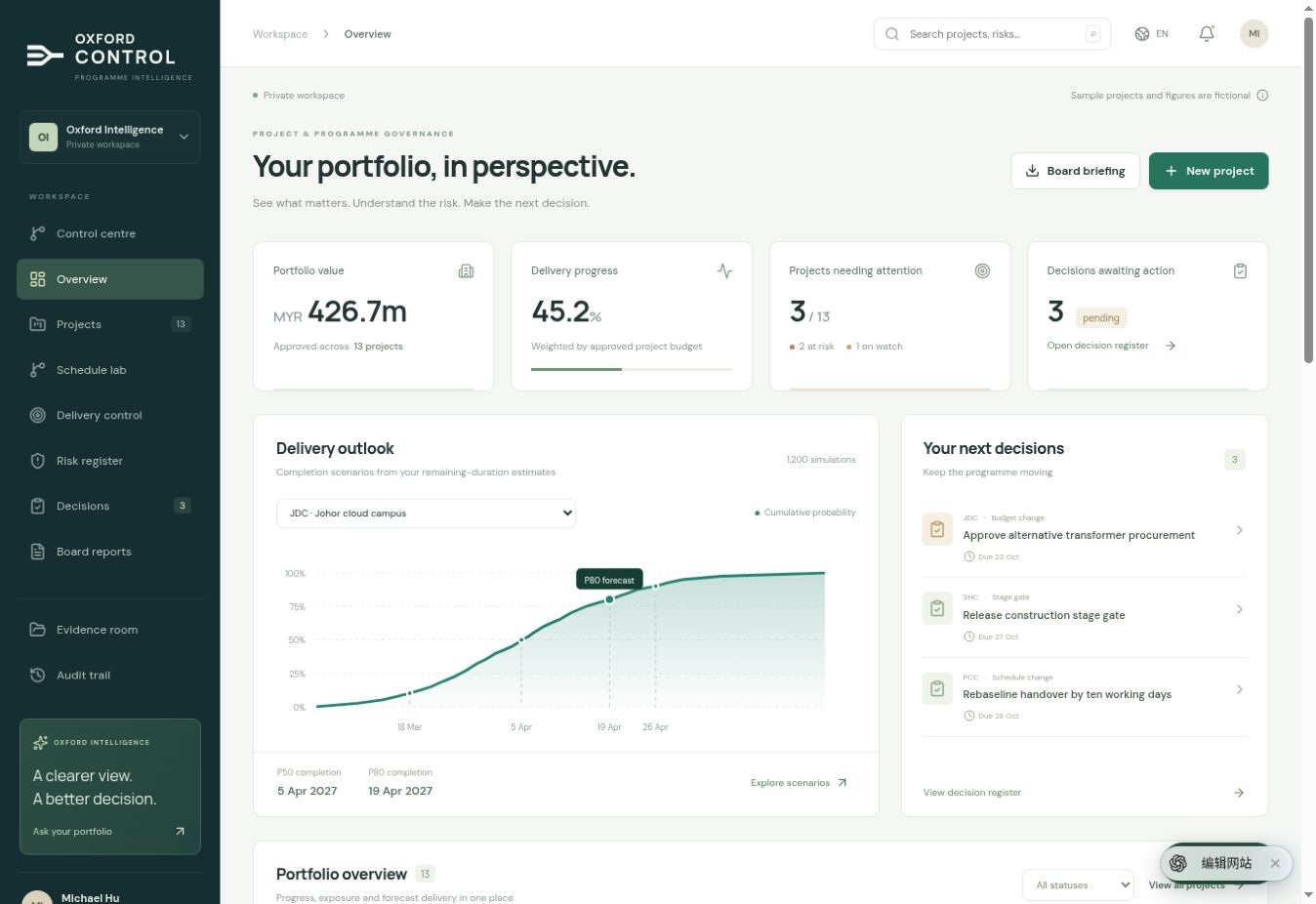
Bring approved budgets, delivery progress, forecast dates and pending decisions into one working view. Start with the portfolio, then open the project or issue behind a headline. Your review can move from “what is happening?” to “what should we do next?” without losing the context.
ACTUAL WORKSPACEFictional sample projects
Portfolio overview: delivery status, completion outlook and outstanding decisions.
WHAT YOUR TEAM CAN DO
See delivery status and progress across your projects.
Compare completion scenarios alongside the assumptions behind them.
Open outstanding decisions and the risks that need a response.
Move from portfolio oversight into the underlying schedule.
Screenshots show the English workspace; this product guide is available in English and Chinese. The public page does not connect to or expose your private project data.
BUILT AROUND THE PEOPLE MAKING DELIVERY HAPPEN
One programme. Different responsibilities. A shared view.
Each team needs a different level of detail. Oxford Control connects those levels so that the executive summary and the working plan can support the same conversation.
01
Programme leaders & sponsors
Know where your judgement is needed.
See which projects require attention, which decisions are waiting and how a proposed change affects the delivery outlook. Use the portfolio view to prepare the conversation, then inspect the evidence behind a specific concern.
Focus on material delivery exposure.
Give approvals the context they need.
Return to the reasoning behind earlier decisions.
02
PMOs & governance teams
Build a repeatable review rhythm.
Bring schedules, risk registers, decisions, reports and evidence into a connected workspace. Maintain version history and structured records so that the next review starts from an understood position.
Keep reporting and project records connected.
Track ownership, status and outstanding actions.
Review changes and preserve their history.
03
Planners & delivery managers
Work the detail without losing the bigger picture.
Inspect activity logic, calendars and resource demand. Compare the consequences of alternative plans, then explain the trade-offs to the people who must approve them.
Identify critical activities and weak assumptions.
Coordinate resource pressure across projects.
Review and adopt a revised plan deliberately.
A REALISTIC DELIVERY CONVERSATION
A supplier slips.
Your next step should be clearer.
Imagine a critical piece of equipment will arrive late. Work through the consequences, compare the recovery options and take a reasoned proposal to the people who need to decide. The same information then supports your next board briefing.
01
Schedule intelligence
Understand the impact
Update the remaining duration or relevant dependency, then inspect the activity network and completion scenarios. See which downstream activities and target dates are affected.
02
Resources & scenarios
Compare your options
Review an alternative sequence or resource allocation. Check shared capacity and calendar constraints so that the recovery proposal does not simply move a conflict into another project.
03
Decisions & evidence
Make the decision explicit
Record the proposed response, the supporting information and who must approve it. Keep the outcome and follow-up action with the project so the team understands what was agreed.
04
Versions & board reports
Explain the new position
Bring the revised delivery outlook, remaining risk and decision into the next board briefing. Preserve the earlier schedule and report for subsequent comparison.
Illustrative workflow. Proposed changes remain subject to your team’s review and approval.
DEPTH BEHIND THE DASHBOARD
Built for the questions
a project actually raises.
The value is in the working detail: what your schedule assumes, how resource constraints are represented and whether a decision can be understood later.
01
Planning that retains its assumptions
Start with an AI-assisted plan draft or import an existing schedule. Review activities, dependencies and assumptions before applying them. Organise work through editable WBS hierarchies and retain versions as the plan evolves.
02
Calendars that reflect the working pattern
Model shifts, holidays and dated exceptions, with project, activity and resource calendar policies. Time zones and native mappings are reviewed explicitly, so working-time assumptions remain visible.
03
Scenarios that make the trade-offs clearer
Compare critical paths, completion distributions and recovery alternatives. Inspect the assumptions, preserve the source plan and keep the reasoning alongside the option your team chooses.
04
Shared resources across competing projects
Map project resources into shared pools and review demand against capacity. Account for dated availability changes, outages and resource working patterns; compare allocation scenarios before adopting the revised plan.
05
Collaboration with a record
Work with scoped membership and permissions, comments, version history and conflict handling. Keep changes reviewable and give approved actions a place in the project’s history.
06
Evidence that supports the narrative
Retain supporting documents, decisions and audit history alongside reporting. AI-assisted analysis can reference available workspace information; people assess the evidence and remain responsible for the final decision.
A PRACTICAL WAY TO EVALUATE THE FIT
Start with a programme
you understand well.
A useful evaluation should answer your team’s questions with your own planning context. We can discuss the workflow, configuration and scope before you commit to a wider rollout.
01
Choose the use case
Identify the programme, the people who need access and the review or reporting problem you want to improve.
02
Review the planning inputs
Agree the source schedules, calendar rules, resource structure and information that need to come together.
03
Walk through the decisions
Use a representative change to explore the schedule, resource, approval and reporting workflow with your team.
04
Agree the rollout scope
Discuss access, configuration, integration prerequisites and commercial terms against a defined scope.
Keep the tools you rely on. Add a connected review layer.
Bring P6 XER, Microsoft Project XML, CSV or Oxford JSON into a reviewable workflow. Native P6 and Windows Microsoft Project connections can be configured for your authorised environment. We review file compatibility, exchange scope and connection requirements with you during setup.
Have a sample schedule and one difficult delivery question ready. That is a useful place to begin.
Questions
Before you take the next step.
Who gets the most value from Oxford Control?
Programme leaders overseeing several projects, PMOs connecting planning with governance, and delivery teams managing dependencies and scarce resources. It is particularly useful when a change needs to be understood, reviewed, approved and explained across several teams.
Do we need to replace Primavera P6 or Microsoft Project?
You can start with the schedules you already maintain. Oxford Control supports P6 XER, Microsoft Project XML, CSV and Oxford JSON imports with compatibility review. Source-backed updates and configured native connections have defined scopes. We review your format, calendars, resources and integration requirements as part of the evaluation.
What does the AI actually do?
AI can turn a project brief into a draft activity plan with dependencies and assumptions, and help analyse the information available in the workspace. Your team reviews what to apply. Critical-path calculations and completion simulations use the planning engine; AI commentary does not change those calculations.
What do P50 and P80 tell us?
They show completion dates at different points in a simulated distribution, based on the durations, calendars and risk assumptions supplied. They help you discuss uncertainty and compare options. They do not provide a guaranteed delivery date or a proven historical accuracy claim.
Can several people work in the same workspace?
Yes. Membership and project permissions control access, while concurrent-edit checks help identify conflicting changes. Decisions, versions and audit records retain the context of the work. Your own workspace remains behind login; the screenshots on this page use fictional examples.
How should we evaluate it for our organisation?
Choose a representative programme, one existing schedule and a decision that is difficult to manage today. Walk through the planning, resource, approval and reporting steps with your team, then agree the required configuration and rollout scope. Native connections need the corresponding authorised environment.
How can we discuss pricing or arrange a demonstration?
Use the enquiry form below to tell us about your organisation, project scale and priorities. Oxford Intelligence can then discuss the appropriate scope, configuration and commercial terms with you. Submitting an enquiry creates no subscription or payment commitment.
START WITH YOUR PROGRAMME
Bring your next programme question.
Tell us about your portfolio, your planning tools and the workflow you want to improve. Start a conversation about a product walkthrough, implementation scope and a commercial proposal for your team.
Explore an import and schedule review around a representative programme.
Focus the discussion on shared resources, approvals or board reporting.
Clarify the scope around your team size and integration requirements.
No confidential files are needed. Your contact details are used to handle this product enquiry and are not displayed on the public website.